Accessibility
Readable Font
Enable an accessibility-focused font.
* Requires local installation.
Model Management
Download Piper Model
Gemini/Google Cloud TTS
Warning: Setting your API key here could incur charges if you exceed your free tier. Use with care.
Show detailed setup instructions
Step 1: Set Up Your Project & API
- Go to the Google Cloud Console and sign in.
- Select or create a new project.
- Search for and enable the Cloud Text-to-Speech API.
Step 2: Create a Service Account & Download Key
- Navigate to the Credentials page.
- Click + CREATE CREDENTIALS and select Service account.
- Follow the prompts to create the account.
- Go to the KEYS tab for your new service account, click ADD KEY, and create a new JSON key. A file will be downloaded.
Step 3: Secure and Use Your Key
Treat this JSON file like a password. Paste the file path into the input box above.
Coqui Voice Cloning
Record or upload a sample file for voice-cloning.
Recording...
OpenAI Compatibility WIP
Map which local voice will be used for each OpenAI voice.
General Settings & Info
Chunk Size
Smaller chunks generate faster but may have less natural pronunciation. Larger chunks provide better context but may be slower.
Additionally, Coqui does not work well with big chunks, clipping the text when it exceeds the limit. If you are planning to use Coqui, keep the Chunk below 50.
Cache Management
Warning: This will permanently delete all cached audio files. This action cannot be undone.
Current cache size: Loading...
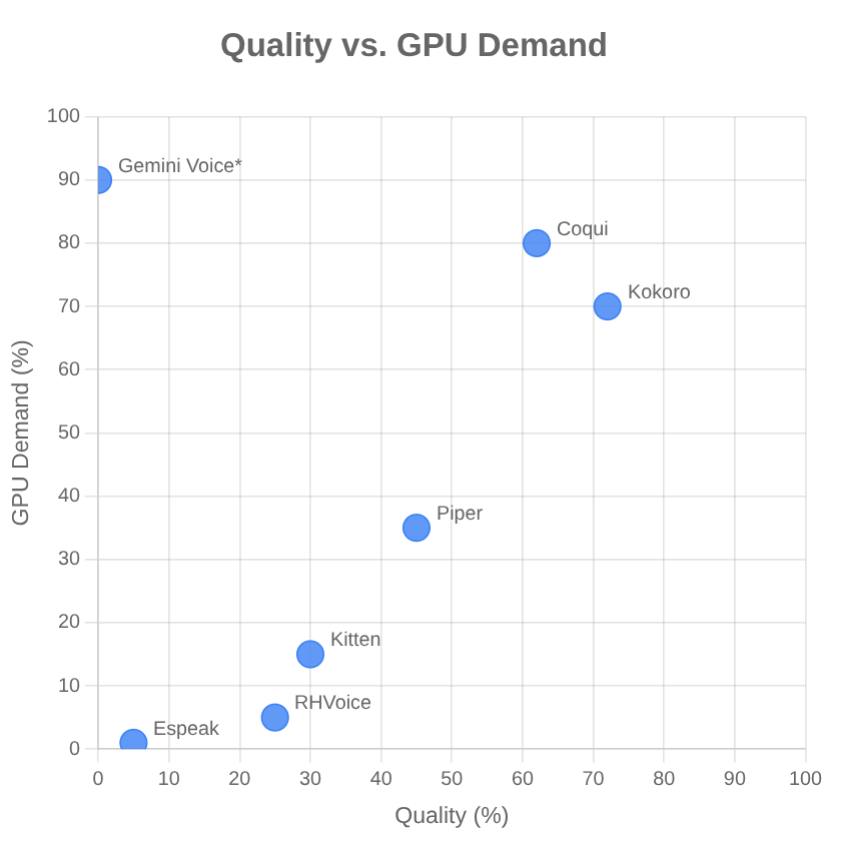
Choosing a Model
Choosing a model compatible with your device is important for performance.
- Coqui: Requires beefy GPU. Ideal for voice-cloning.
- Kokoro: Best for powerful GPUs.
- Piper: A good default choice for most systems.
- Kitten: Lighter than Piper, but not as clear. Ideal for CPU-only systems. Currently only supports English.
- Gemini: A good cloud-based option if Piper is too slow or battery hungry.